 digest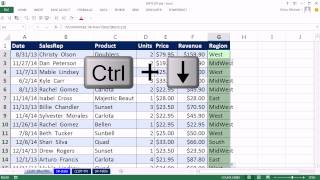
Short Summary
Main recommendation: To use VLOOKUP against a table on a different sheet, use a sheet reference, a defined name for the table range, or a table name with structured (table formula) references, rather than a plain cell range. Each method returns the same region data for 73 sales reps from a separate sheet, and the video demonstrates all three.
Key Points
- The first method, a sheet reference, works by clicking the other sheet tab, highlighting the table range, and pressing F4 to make it absolute, so the formula stays correct when copied down.
- The sheet reference appears in the formula as a sheet name in single apostrophes followed by an exclamation point, which tells Excel it points to another sheet.
- The second method creates a defined name for the table range (here named "sales rep table") and then uses that name in VLOOKUP, with F3 to paste names into a formula (he also notes Ctrl+F3 opens Name Manager to fix the range).
- The third method converts the data to an Excel table, names it "sales rep region" (he initially says "sales rep region table" then shortens it), and uses structured references, where the whole table is referenced as "data."
- Using a table name means new records added to the bottom of the source table are picked up automatically by the lookup formula.
Details Worth Noting
- Concrete instructions:
- Sheet reference method: Click the other sheet, highlight the table with Ctrl+Shift+Down Arrow from the top cell, press F4 to lock references, return to your sheet, enter column index 2 for region and 0 for exact match, press Ctrl+Enter, then double-click to fill down.
- Defined name method: Select the table on its sheet with Ctrl+Asterisk, type a name such as "sales rep table" in the Name Box, and check the range in Name Manager (Ctrl+F3). Remove the field-name row from the range if it was included, and use the name in VLOOKUP with 2 and 0 as the arguments.
- Table method: Select the data and press Ctrl+T with headers in the top row, name the table in Table Tools Design, then in the lookup formula type a square bracket after the table name and choose "data" for the whole table.
- Use exact match (0 or FALSE) even if the data is sorted, in case it becomes unsorted later.
- The table range in the example has 73 records, and the source data has about 10,000 rows of repeated sales reps.
- The presenter notes that choosing the whole table in the sheet method by clicking and dragging can select many unnecessary cells, which is why a keyboard selection is preferred.
Bottom Line
Any of the three approaches lets VLOOKUP reach a table on another sheet; the table-name method is the most flexible because it expands automatically as records are added.


