digest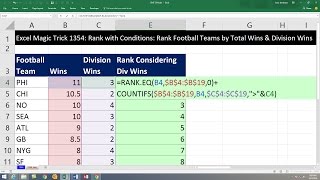
Short Summary
Main recommendation: To rank football teams by total wins with division wins as a tiebreaker, use RANK.EQ plus a COUNTIFS adjustment that adds the number of tied teams above each record. Since Excel has no RANKIF function, this combined formula produces unique ranks such as 8, 9, and 9 for teams tied on wins, where RANK.EQ alone would give them all the same rank.
Key Points
- Excel has no RANKIF function; the three available ranking functions are RANK.AVG, RANK.EQ, and RANK, with RANK being the older equivalent of RANK.EQ.
- RANK.EQ assigns the same rank to tied values, and RANK.AVG averages the ranks of tied values, so neither handles a secondary condition on its own.
- The COUNTIFS add-on counts records with the same total wins and more division wins, which is the number of teams that should rank above each tied team.
- The combined formula, with COUNTIFS added to RANK.EQ, gives the teams with eight wins ranks of 7, 8, 9, and 9, and the teams with five wins ranks of 12, 13, and 14, since the two five-win teams tied on division wins.
Details Worth Noting
- Concrete instructions:
- Sort the data by total wins from highest to lowest, with the secondary condition (division wins) already ordered within ties.
- Rank on total wins with RANK.EQ: put the wins cell as the first argument, lock the full wins column with F4, and use 0 as the order argument for descending.
- Build the COUNTIFS adjustment with two criteria: the wins column (locked with F4) equals the current wins value, and the division wins column (locked with F4) is greater than the current division wins value, written as ">"&cell reference.
- Copy the COUNTIFS formula, then edit the RANK.EQ formula and add the COUNTIFS formula after the equal sign with a plus sign, then fill down.
- The video uses the example of the New York Giants, San Francisco, St. Louis, and Minnesota, all tied at eight wins, where St. Louis and Minnesota each have two teams above them on division wins.
- The COUNTIFS logic is an AND test: it counts only records that meet both conditions simultaneously.
- The workbook for the video is available from a link below the video, so viewers can follow along.
Bottom Line
Combining RANK.EQ with a COUNTIFS tiebreaker is a practical way to rank on two conditions in Excel without a dedicated RANKIF function.