digest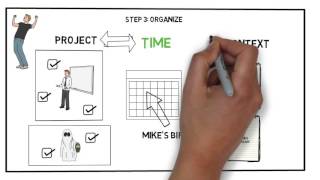
Short Summary
Main recommendation: Use Getting Things Done (GTD), David Allen's five-step system of capture, process, organize, review, and engage, to externalize every task and idea so your mind stays clear and nothing important slips through. The video frames the core problem as the brain being for having ideas, not for holding them, so the system moves commitments out of memory and into trusted lists and a calendar.
Key Points
- Capture everything that demands attention, including emails, letters, calls, action items from conversations, and your own ideas, so it no longer lives only in your head.
- Processing asks one question per item: is it actionable (yes or no)? Actionable items get done, scheduled, or delegated to a list; non-actionable items are discarded or filed as reference.
- Organize actionable items by project, by time (calendar deadlines), and by context (such as phone calls or errands), and always identify the next physical action.
- Non-actionable ideas you want to keep go onto a "someday maybe" list with a recurring review date, instead of cluttering your active lists.
- A weekly review keeps the system current, and a monthly review checks whether your actions are moving you toward your short-term goals or just keeping you busy.
Details Worth Noting
- Concrete instructions:
- Capture: Write down or externalize every incoming item (emails, letters, calls, conversation action items, your own ideas) so you don't keep it in your brain.
- Process each item by asking: "Is it actionable?" If no, discard it or keep it as reference; if yes, ask: "Would it take less than two minutes?" If yes, do it immediately; if no, add it to an action items list, or schedule it if it needs a set time (for example, a 20-minute conversation).
- Organize actionable items by project (grouped together), by time (deadline-specific items go on your calendar), and by context (such as phone calls or groceries). Items can appear in more than one category.
- For each action, ask: "What is the next action?" Example: the next action for calling Mike is "find Mike's number," not "call Mike."
- For non-actionable items: keep them for reference (for example, a TV manual), or add them to a "someday maybe" list and create an action item to review that list in six months.
- Weekly review: check that everything is where it belongs and process any piles of unprocessed information.
- Monthly review: check short-term goals (such as saving for a car or learning Spanish) and whether your actions support them.
- Engage: work from your calendar for today's tasks, your project list for next steps, and your contexts to batch similar tasks; when new information arrives, capture it and run it through processing again.
- The video's own example of the problem: forgetting a best friend's birthday call because a pile of mail, dishes, and chores took over the evening.
- The video suggests tweaking GTD to fit your own needs, since you know best how to group and prioritize your items.
- The video is an animated book summary and review; the advice above comes from its explanation of the method rather than from a clinical or professional source.
Bottom Line
GTD works by sorting every incoming item once into "do it now, schedule it, delegate or list it, or file or drop it," so your mind is free to focus on the next action rather than on remembering everything.